How I automated my learning workflow so my AI assistant handles the boring parts
The Problem
Learning a complex technical subject — robotics, control theory, machine learning — is not just about reading. It's about processing, summarizing, revisiting, and turning dense material into lasting understanding.
After the third time I forgot a concept I had "read" two weeks ago, I started thinking: why is my AI assistant not doing this for me automatically?
The challenge is that AI tools are only as good as the pipeline feeding them. Notes sit in Obsidian. Videos sit in NotebookLM. Reminders sit in a calendar. None of them talk to each other.
I wanted a system where:
- I take notes in Obsidian (my PKM)
- An AI agent automatically turns those notes into study materials
- I get reminded at the right time with the right content
- Everything persists across server restarts
This post is about that pipeline — not a specific tool I built, but the architectural pattern I landed on after months of iteration.
The Stack
| Layer | Tool | Role |
|---|---|---|
| Capture | Obsidian | Daily notes, research, study sessions |
| Content Generation | NotebookLM (Google) | AI-generated videos, podcasts, quizzes from sources |
| Automation | OpenClaw | Cron jobs, reasoning, notifications |
| Persistence | Git-synced vault | Everything survives server restarts |
The key insight: each tool does what it's best at. Obsidian for human note-taking. NotebookLM for AI content generation (it's genuinely better at video summaries than any open-source alternative I've found). OpenClaw for orchestration and persistence.
The Workflow
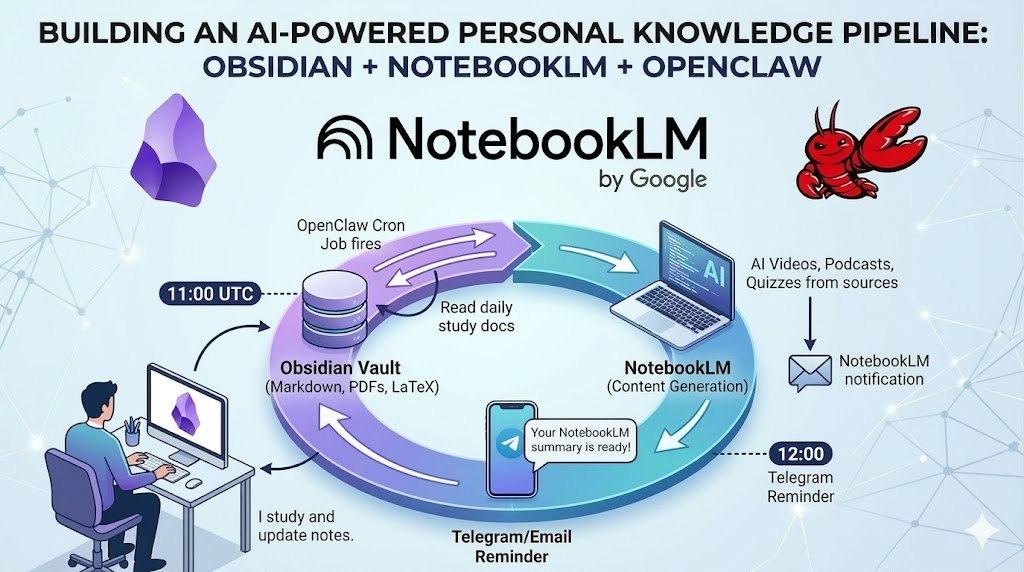
Here's what runs every weekday at 11:00 UTC:
11:00 — OpenClaw cron job fires
       ↓
       Reads today's study session doc from Obsidian
       ↓
       Adds it as a source to the NotebookLM notebook
       ↓
       Kicks off a video generation (no waiting, no downloading)
       ↓
       NotebookLM sends a notification when it's ready

12:00 — Telegram reminder arrives with a brief lecture guide
       ↓
       I study. I update my notes. The cycle repeats.
The agent handles the logistics. I handle the learning.
Why Not Just Use One Tool?
You could try to do all of this in a single system. But:
- Obsidian has the best human-facing editor for technical notes — LaTeX, diagrams, bidirectional links
- NotebookLM has the best AI video/podcast generation I've found — it actually understands the material
- OpenClaw has the best scheduling + Telegram integration for personal use
Each is specialized. The pipeline is greater than the sum of its parts.
Key Design Decisions
1. Content lives in Obsidian first
Everything starts in Obsidian. Daily session notes, reading highlights, questions. The Obsidian vault is the single source of truth. NotebookLM just consumes it.
2. NotebookLM generates, not stores
I don't use NotebookLM as a database. It generates artifacts (videos, quizzes) on demand and sends notifications. The generated content lives in Obsidian afterward, if I save it.
3. Auth tokens are stored in the persistent layer
This was the trickiest part. NotebookLM authentication lives in browser cookies. In a server environment, those cookies need to survive container restarts.
The solution: store auth state in a persistent volume (/data/obsidian-vault/_notebooklm/), not the ephemeral container filesystem. A bootstrap script restores the environment on restart.
4. The agent is stateless between sessions
OpenClaw wakes up fresh each session but reads yesterday's notes from Obsidian. Memory is in the vault, not in the agent's internal state.
What It Looks Like in Practice
For a typical study session:
| Time | Event |
|---|---|
| 11:00 | "Generating Day 12 video: Model Predictive Control for Underactuated Robots..." |
| 11:05 | Email/notification: "Your NotebookLM video is ready" |
| 12:00 | Telegram: "Good morning! Today's topic: MPC. Yesterday you covered..." |
| 12:00–13:00 | Study time |
| Evening | I update my notes. Tomorrow's agent picks them up. |
Results
After ~30 sessions of this workflow, a few things are clear:
-
The video summaries are surprisingly good — NotebookLM distills dense papers into watchable overviews. Not perfect, but genuinely useful for revision.
-
The reminder loop works — Having a daily nudge at the same time builds habit. The agent handles the "what should I study today?" friction.
-
Notes improve when you know they'll be used — Writing for future-me (who'll get an AI summary) changes how I take notes. More structure, clearer questions.
-
Debugging the pipeline is still annoying — Cron misfires, auth expiry, NotebookLM rate limits. It's automated, but not invisible.
The Pipeline Pattern
This is not a product. It's a pattern. The same architecture works for:
- Research pipelines — paper → summary → flashcards → review
- Course study — lecture notes → video → quiz → spaced repetition
- Project documentation — meeting notes → summary → status report
The core idea: separate capture, generation, and delivery. Let each layer do what it's best at. Connect them with a thin automation layer that handles timing and persistence.
Conclusion
AI assistants are only as useful as the systems around them. If your notes are a mess, your assistant will have nothing good to work with. If your assistant can't schedule and remind, you'll forget to use it.
The pipeline won't make you learn. But it removes friction, builds habit, and makes sure that when you do sit down to study, the material is already summarized, the videos are ready, and the agent has already told you where you left off.
That's not intelligence. But it's close enough.